Thursday, May 10, 2007

Sun JavaFX -Is this Ajax for Mobile?

So is this Ajax by Sun for Mobile? - this was what I said when I firt heard about JavaFX Mobile yesterday.

Sun Microsystems has announced JavaFX Script, a new family of Java for consumer rich media products like desktop web browser, TV, BluRay, automobile and mobile devices. The first product release is JavaFX Mobile.

According to Jeffrey Hammond, senior analyst at Forrester Research, this is more like JavaScript than Java, and could be an alternative to AJAX and also vies with Microsoft's Silverlight and Adobe's Apollo.

Anything ends with X sounds like a phony buzzword but this actually does sound interesting.

Sunday, April 29, 2007

So You Want to Build Mobile Website - 1. Markup

Maybe I should write something I know about mobile web (wap) developement sometimes since the demand is getting bigger here in the US.

First, you may wonder what markup you should use. Your choice may depend on where you are, or where your target viewers are. For majority of people/regions, main choice is probably XHTML, but there're still plenty of people in the world use devices support only WML. (I'm taking to you, Google!). If you are creating wap site for those cute Japanese phones, you may want to write in CHTML. If you are in India, your best choice would be WML.

Here's a list of markups and DTDs (if required):

XHTML Basic

XML-based markup typically for handheld devices

<!DOCTYPE html PUBLIC "-//W3C//DTD XHTML Basic 1.0//EN"
"http://www.w3.org/TR/xhtml-basic/xhtml-basic10.dtd">

XHTML-MP

XHTML Mobile Profile. This is a variant of XHTML Basic, defined by Open Mobile Alliance. This is usually my choice. Yes, it supports CSS!

<!DOCTYPE html PUBLIC "-//WAPFORUM//DTD XHTML Mobile 1.1//EN"
"http://www.wapforum.org/DTD/xhtml-mobile11.dtd">

WML

Wireless Markup Language. This is going to be phased out but majority of devices in India supports only WML. This is similar to HTML but there're lots of special tags not included in HTML. There're some features missing in XHTML, such as softkey configuration that I wish included in XHTML-MP.

<!DOCTYPE wml PUBLIC "-//PHONE.COM//DTD WML 1.1//EN"
"http://www.phone.com/dtd/wml11.dtd">

HDML

Handheld Device Markup Language, defined by Openwave. Some Japanese phones use this, and if I am not wrong, I think some Motorola (US) phones too.

CHTML

Compact HTML -similar to WML and HDML. Used only, yet big in Japan, and it works on Japan's DoCoMo's i-mode phones. More Japanese manifacturers started making devices that support XHTML so this will be pased out sooner or later.

MML

Mobile Markup Language. Another Japan-only markup and defined by J-Phone (now SoftBank Mobile) and Keio University. Who uses it anyway?


You must have notice there're too many (yes, I'd say too many) Japanese variants, but it looks like Japanese phone companies have started following global-standard way and more devices will support XHTML and replace the older devices soon.

Conclusion: Although I mentioned earlier that Google doesn't care about Indian users by not supporting WML, for majority of people, if you want to pick only one, I'd say you should write in XHTML.

I will write about more in details later.

Saturday, April 28, 2007

Is it real? - Google's Mobile Device Photo

The rumor about Google's phone has been around, and the recent New York Times article (Big Money in Little Screens) has confirmed it really does exist by saying:

Google has gone so far as to build a prototype phone with its own software inside, according to one person who has seen it.
Now, this the first time I saw a photo of the concept design. To be honest I don't believe it is real. It's just too ugly to trust.

Source: Engadget Mobile

Thursday, April 19, 2007

Call cheap with Skype on Fring on Symbian Phones

OK, this is not a new news but my first trial on VoIP call from my mobile phone.

My headset broke, and I had to yell at my PowerBook to be able to talk with my dad via Skype. "HEEELLLOOO DAAAD?" 5 minutes of yelling made me tired. I need a new headset. But instead of buying another brand-new defected made-in-China headset on eBay, I decided to try Skype on mobile handset.

Since Skype hasn't gone mobile yet, I wanted to give some alternatives a try on my wifi'd N80 and just tried for the first time last weekend.

For some reasons, my first choice, iSkoot failed to connect, so after my 5th trials, I uninstalled it and installed Fring. Yay. This worked without any problem for me! I was able to make a call by logging into my Skype account. The sound quality is less than perfect, but so is Skype on desktop. I am pretty satisfied. But to call my dad, who has started losing his hearing a bit, I should just pay for regular phone bill.

fring (beta)

Tuesday, April 17, 2007

Mobile 2.0 @ Web 2.0 Expo

I was at Web 2.0 Expo at Moscone West on Tuesday. Mobile 2.0 Keynote, Nokia's new widget for S60 (Web Run-Time), and Google's big interest for mobile (looking for mobile start-ups for aqcisition?)... I was sure that the mobile would be next big thing for the year 2007 last year, and now I feel it. Apple's iPhone is coming soon too!

As a mobile web developer, I've been busy and will be busier for sure!

Also the Bento Box and organic white tea I had for lunch at Samovar Tea Lounge )located by Moscone Center)were delicious.

Sunday, April 15, 2007

N76 Design Contest

I haven't design for ages but I'd like to try -something pink/girly! http://www.nseries.com/n76

Monday, April 09, 2007

Dare to Compare - Mobile Search

Soon after Yahoo! launched this new mobile search, oneSearch (news:Yahoo jumps ahead of Google on mobile phone search), Google tried to catch up with by adding a link to another search page with some new feature, just like Y!'s oneSearch (google.com/m). The images above are the actual screenshot of the serach result of "godzilla" on Yahoo oneSearch and Google's new search.

Also see this interesting comparison (pdf): Dare to Compare - Google vs. Yahoo!

Wednesday, February 14, 2007

Happy V-Day!

Ooo. I am a sucker for anything pink. Nokia Europe introduced the pink collections for Valentine's Day. Sweet.
Oh, wait. They are all S40, not S60... Girls don't need smart phones, do they?

Tuesday, January 09, 2007

Sweet! Apple's iPhone


Wi-Fi, Bluetooth 2.0, Quad-Band GSM (yay! world-wide phone!), EDGE (No 3G!?)
OS X, Safari (I bet this will work just like Nokia's S60 browser.)
Collaboration with Yahoo - free IMAP email to all iPhone customers!
Google Maps and Widgets

I am hoping this will work wirh Skype, but I don't think Cingular will like it at all...

The Price:
4GB model = $499
8GB model = $599
Shipping in June!

Wait. This price is for 2-year contract with Cingular.... I knew it...

Source: Gizmodo

Friday, January 05, 2007

Search 2.0?

Everything goes 2.0. What's next?
According to Read/WriteWeb, the next 2.0 is a "Search".

This article shows the results of the concepts to beat Google. The top idea of the next generation search is the Artificial Intelligence. Yet there's no true AI search engine on market yet, the closest possible so far is Hakia that I already liked it because more knowledge and news based results, mainly recently posted blog entries, are listed as the search results, and they are quite different from that of Google.

Here's a list of other suggestions:

  1. Artificial Intelligence (e.g. Hakia, Powerset)
  2. People Powered Search (e.g. del.icio.us, ChaCha)
  3. Vertical Search (e.g. SimplyHired, Technorati)
  4. Personalized Search (e.g. Collarity)
  5. Clustering (e.g. Clusty, SearchMash)
  6. Social Search (e.g. Eurekster, Rollyo)
  7. Visualization (e.g. Quintura and Kartoo)
  8. Previews (Snap, Live Image Search)

interesting.

Tuesday, December 26, 2006

I got a pink MacBook on Xmas...

...Not! I wished...

Available at: Coloreware

Monday, December 18, 2006

Hate to type on mobile phone! - Use QR Code!

I think it was back in 2004, when I visited my family in Japan, I found some weird looking barcode-like thingies everywhere on paper and magazines. They didn't look like the traditional barcodes with a bunch of vertical lines. I was stearing one as I was trying to figure out how to decode this cyptic message from outer space or something, then finally asked my brother. He was actually really surprised that I had no idea what they were.

Well, anyway what I saw was called QT code, a matrix code (2-D code) that contains info, mainly URLs of mobile websites. Use your camera phone and scan the barcode so you don't have to type them in with non-qwerty devices!

Now it is almost the end of 2006, here in the US, I finally have a chance to use the barcode with Nokia N93, which comes with a barcode reader software (and 3.2 megapixel camera!)

Then I wonder how I could adopt the QR code for own wap sites and googled it. Sweet enough I didn't have any difficulty to find some QR-code generators. The one I liked is qrcode.kaywa.com. The image below is the example I created on the website. This stored a URL for google's mobile site, google.mobi (I believe this is their new domain and slightly different from mobile.google.com. This site has UA detection.)

google.mobi

Related Sites and Articles:

Wednesday, November 29, 2006

Nokia Music Mixer

I got a new N93 before Thanksgiving and have been having fun with it since the holiday weekend.

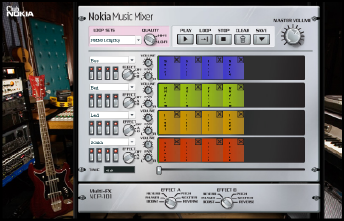
Now I found that Nokia launched another cool toy I can play with my new N93 - Nokia Music Mixer. This is an web application (Flash) that allows you to remix tracks and download them as ring tones. This seems to be a part of Nokia 5300 XPressMusic phone campaign, and you can join the mix competition to win the new phone!

Monday, November 13, 2006

10 Things Brian Learned at Mobile 2.0

"10 Things I Learned at Mobile 2.0" (by Brian Fling of Blue Flavor) has a great summary about interesting facts on Mobile 2.0 Conference that I still regret I didn't go. I am glad that there're some good web/blog I can read about the conference.

  1. Mobile 2.0 = The Web
  2. The mobile web browser is the next killer app (Mozilla Minimo)
  3. Mobile Web Applications are the future
  4. AJAX is the next frontier
  5. Javascript kills battery life
  6. The Mobile User Experience Sucks/Rules/Is Hot!
  7. Mobile Widgets are the next big thing
  8. The Carrier is the new "C" word
  9. People abuse the Podium
  10. We are creators not consumers

I cannot agree more about mobile user experience. I am sure that everybody who have browsed mobile web sites have encountered some difficulty navigating in some point. User-experience really is a key for handheld devices!

Thursday, November 09, 2006

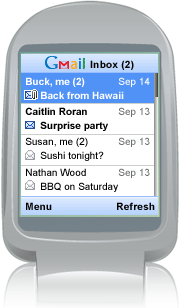
Gmail Mobile App

It's faster than Gmail mobile web and you can view attachments too!

View demo on web (on PC)

I feel that we (people here, in the US) are so behind of mobile technology, compared to Europe and Asia. Though we all have heard of the new term, "Mobile 2.0", I believe most of us don't get much benefit of because we are so stuck with phone provider's own business models (providing customers locked phones and charging fees for whatever services). I am hoping soon we are able to get some descent Wifi-enable mobile phones cheap and enjoy so-called Mobie 2.0, without worrying bills.
(BTW I just missed Mobile 2.0 Conferene here in SF... Stupid me.)

BTW, I was excite about that YouTube on Mobile, but I found out that they are in the process with Verizon (source: Mashable!). Verizon wil charge $15 per month for this service. Like I just mention, we are stuck with the providers plans.

Friday, November 03, 2006

YouTube to Go Mobile

According to MobileCrunch, YouTube will go mobile!

Currently, youTube allows you to upload from your mobile, but can't watch video on your mobile. In near future, you can watch videos in your hand!

Friday, October 27, 2006

Mobile Web Best Practices 1.0

456 Berea St (great site!) has a summery of W3C's Mobile Web Best Practices 1.0. It's stupid to summarize the great summary here, but I am doing for my own "notekeeping" sake.

  • Use link target ID
  • No Pop-ups
  • One way scrolling
  • Use of color
  • No frames
  • No table layout
  • Use text alternative for images/image maps/scripts etc.
  • No embedded object
  • Valid markup
  • Label all controls

I've learned them from trial-and-error approach when I was writing separated CSS files for several Nokia devices, but I am glad to find that W3C is working on this documentation.

Someday, I 'd like to work on my own documentation but I suck at writing. I feel like I am such an idiot after spending 1/3 of my life in the US and still struggling with English language. sigh.

Here's some usuful mobile web related links I've bookmarked/del.icio.us'd:

Tuesday, October 17, 2006

Using Google Maps API - Part.4: Info Window

Let's add more functions on the SFO map example.

Opening a Info Window

To create a basic baloon-like floating "info window", call the openInfoWindow(htmlElement) method, passing it a location and a DOM element as an argument to create a text node.

map.openInfoWindow(new GLatLng(37.622934, -122.392159),
                   document.createTextNode("SFO"));

or, use similar method openInfoWindowHtml(htmlString) which takes an HTML string as its argument rather than a DOM element.

map.openInfoWindowHtml(
 new GLatLng(37.622934, -122.392159), "SFO");

Opening a Info Window on Click

Simply calling these methods above just display the info windows upon loading the map. If you want the info window opened by clicking a marker, you need to use event listeners. The static method, GEvent.addListener takes a marker as the 1st argument, the event as the 2nd argument, and a function as the 3rd argument. The events provided by GMap2 Class include; click, infowindowopen and infowindowclose. To open a info window on click, write:

GEvent.addListener(marker, "click", function() {
          marker.openInfoWindowHtml("SFO<br/>CA 94128");
    });

Finally, to give the event to the custom icon previously made, create a new function to combine both displaying the icon and call the click event. The function createMarker takes four arguments, latitude, longitude, icon image URL, and description (html).

In addition to the GIcon properties previously set, define infoWindowAnchor and infoShadowAnchor as well.
var desc_sfo ="SFO - San Francisco Intl Airport<br/>CA 94128";
var marker_sfo = createMarker(37.622934, -122.392159, "icons/sfo.png", desc_sfo);
map.addOverlay(marker_sfo);

function createMarker(lat, lng, ico, html) {
 var point = new GLatLng(lat, lng);
 
 if (ico!=null) {
  var icon = new GIcon();
  icon.image = ico;
  icon.shadow = "http://www.google.com/mapfiles/shadow50.png";
  icon.iconSize = new GSize(26, 44);
  icon.shadowSize = new GSize(50, 44);
  icon.iconAnchor = new GPoint(13, 44);
  icon.infoWindowAnchor = new GPoint(9, 2);
  icon.infoShadowAnchor = new GPoint(18, 25);
 }
 var marker = new GMarker(point, icon);
 GEvent.addListener(marker, 'click', function() {
  marker.openInfoWindowHtml(html);
  });
  return marker;
}

See also: Google Maps API Version 2 Reference

Monday, October 16, 2006

Using Google Maps API - Part.3: Create a Custom Icon

Let's continue on the quick guide of using Google Map API.

Using Custom Icons

The hardest part is creating graphics for your marker image and its shadow with Photoshop or something. The icons should be cretaed in 24-bit png format. For this example, I just tweaked the default icon (the color changed to blue, made it bigger, and typed "SFO" in it!) and used default shadow.

To replace the generic icon to your custom icon, add this code in the last script, before the line that begins with var marker = ...

var icon = new GIcon();
icon.image = "icons/sfo.png";
icon.shadow = "http://www.google.com/mapfiles/shadow50.png";
icon.iconSize = new GSize(26, 44);
icon.shadowSize = new GSize(50, 44);
icon.iconAnchor = new GPoint(13, 44);

First, create a new icon instance (line 1).
Next two lines indicate icon/shadow image source path or URL. (I use default shadow image on Google server).
Next two specifies the image dimention in pixels.
iconAnchor point of the icon is the "pointy" tip where also its shadow image originates. In this case, the anchor point is 13 pixels over and 44 pixels down from the top-left corner of the SFO icon, and this is defined by iconAnchor (line 6).

Location of the marker is defined by GMarker, just as you see in the last example, except, this time you need to add the 2nd paramter to include the custom icon. Finally, call addOverlay() method to dispaly thr marker icon.

var marker = new GMarker(new GLatLng(37.622934, -122.392159), icon);
map.addOverlay(marker);

Next: Opening an Info Window