Nokia has announced the launch of WidSets is a mobile widget platform available for Java MIDP 2.0 phones and is manufacturer and browser independent (that works non-Nokia phones too). Like widgets on a computer, you can access to information from RSS feeds (news, blogs, flickr, etc). This is like for the mobile what Netvibes is for the browser. Cool.
Friday, October 06, 2006

Rounded Corner with Images - Create a Nav Bar
This is another example of round-corner in CSS, but this one requires images. The figure 1 is a screenshot of the actual horizontal nav bar I created a while ago.

Figure 1.
For this nav bar, I created 4 images - Top-left and top-right for the nav bar, and top-left and top-right corner for tabs. All images are created in 4 pixel by 4 pixel dimension. The figure 2 show the top-left of nav bar, and top-left of tabs.
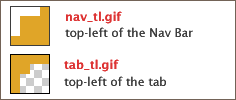
Figure 2.
The nav_tl.gif (nav) has orange round corners, while tab_tl.gif (tab) has orange background with transparent corners, because I wanted to create a "selected" tab and mouse-over color-change effect only with CSS color change, without using extra images.
The code below is the HTML part of the nav bar. I assign the background-image to <a> tag for top-left corner gif, and I gave nonsense tag, <span> to apply the top-right corner gif as background image.
HTML (Navbar using unordered lists)
<div id="navBar">
 <ul>
  <li><a href="#" class="selected"><span>Home</span></a></li>
  <li><a href="#"><span>Blog</span></a></li>
  <li><a href="#"><span>Extras</span></a></li>
 </ul>
</div>
Tabs with Round-Corners
/* Top-left corner */
#navBar a {
 background: url("images/tab_tl.gif") no-repeat top left;
}
/* Top-right corner */
#navBar a span {
 background: url("images/tab_tr.gif") right top no-repeat;
}
/* Hover-state ("Blog" tab in Figure 1) */
#navBar a:hover {
 background-color: #F9CA66;
}
/* Selected Tab ("Home" tab in Figure 1) */
#navBar a.selected, #navBar a.selected:hover {
 color: #750;
 background-color: #fff;
}
The entire CSS for the nav bar looks like this:
CSS (All)
 #navBar {
  font-family: "Trebuchet MS", Helvetica, sans-serif;
  font-size: 18px;
  width: 270px;
  color: #fff;
  background: #e0a528 url("images/nav_tl.gif") no-repeat top left;
  position: relative;
 }
 #navBar ul {
  white-space: nowrap;
  padding: 10px 15px 0;
  margin: 0;
  background: url("images/nav_tr.gif") no-repeat top right;
  overflow: hidden;
 }
 #navBar li {
  display: inline;
  list-style-type: none;
 }
 #navBar a {
  color: #fff;
  text-decoration: none;
  padding-left: 10px;
  margin: 0 3px;
  background: url("images/tab_tl.gif") no-repeat top left;
 }
 #navBar a span {
  background: url("images/tab_tr.gif") right top no-repeat;
  padding-right: 10px;
 }

 #navBar a:hover {
  background-color: #F9CA66;
 }
 #navBar a.selected, #navBar a.selected:hover {
  color: #750;
  background-color: #fff;
 }
Thursday, October 05, 2006
Quick and Dirty CSS Round-Corner
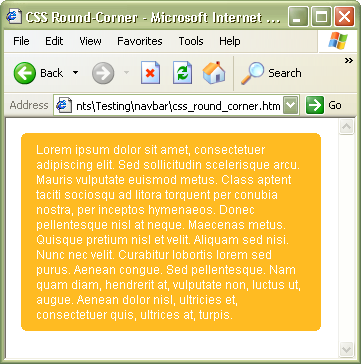
Another way to create CSS rounded corners without images. When using -moz-border-radius is not an option, this is a quick and easy solution that works with IE 6+ .
A quick way to create round-corners without using any images
Use an inline element such as <b> that acts like pixels.
The reasons for using <b> tags:
because it doesn't have semantical meaning, and can be nested in any tags.
CSS:
.box {
  background: #fb2;
  color: #fff;
}
.box p {margin: 5px 15px;}
.rTop, .rBottom {
  display:block;
  background:#fff;
}
.r1, .r2, .r3 {
  display: block;
  height: 1px;
  overflow: hidden;
  background:#fb2;
}
.r1 {margin: 0 4px}
.r2 {margin: 0 2px}
.r3 {margin: 0 1px; height: 2px}
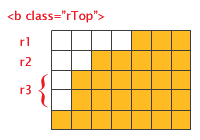
"Magnified view" of the rows (r1 thru r3) that act as pixels. For larger corner radius, increase the numbers of the rows and modify the margins and height on each row.
HTML:
<div class="box">
  <b class="rTop">
    <b class="r1"></b> <b class="r2"></b> <b class="r3"></b>
  </b>
    <p>content here</p>
  <b class="rBottom">
    <b class="r3"></b> <b class="r2"></b> <b class="r1"></b>
  </b>
</div>
Wednesday, October 04, 2006
Rounded Corners for Mozilla/Firefox
In Mozilla, -moz-border-radius can be used to give borders rounded corners. This is one of the proposals leading to the proposed CSS 3 border-radius property.
Syntax:-moz-border-radius: <border-radius>{1,4} | inherit
Example
.box {
  background-color: #fb2;
  border: 1px solid #000;
  -moz-border-radius: 7px;
  -webkit-border-radius: 7px; /* for WebKit */
  padding: 15px;
}
Individual corners
The border-radius can be specified individually for each corner
  border-top-right-radius
  border-bottom-right-radius
  border-bottom-left-radius
  border-top-left-radius
Friday, September 29, 2006
New Juicy Couture @ Westfiled SF


This is nothing to deal with web dev stuff. I stopped by the new expanded mall, Westfield Centre that opened yesterday. After my stressful day, I was too exhausted to shop so I decidec to just check out a new Juicy Couture store and Bloomies. The blurry photos here are snapshots from Juicy boutique.
Last week I read an article about Juicy's business success, and liked the quote by "so not corporate" co-founder, Gela Nash-Taylor.
We thought an IT platform was a shoeI wish the industry I belong were that stylish...
Tuesday, September 26, 2006
Crafty Girls Go Web2.0

I've been a crafty girl ever since I was little. I have made a lot of dolls, stuffed animals, beaded necklaces, hats etc, and I was even a leader of a craft club in my grade school era. When I was unemployed in 2001, I bought tons of inredients and equipments to make soaps, and I spent my free time (= when I was not browseing Dice or Monster) for soapmaking. Since I am such a geek, I even created some online calculatior with girly interface for soapmakers to compute the amount of NaOH.
Therefore, I am happy to find this social networking site for crafty people like me - designestolove.com. Here, you can showcase your designs, share your opinions and ideas and meet people with the same interests. This site provides RSS feeds so you can always get informed with latest additions, but some useful features such as serach or tagging are missing. Since this is still in beta, I hope they will add in future.
Wednesday, September 20, 2006
DNC Launches PartyBuilder
The Democratic National Committee launched PartyBuilder, an social networking site for civic action to empower Democrats to get more involved in the November elections.

Friday, September 01, 2006
Memo: Mobile UAProfile
Mobile Device User Agent Profile (UAProf) specification:
- UAProfile Central
- UAProf profile repository (Major manufacturers)
- Nokia Device UAProf RDF List
- List of User Agent Strings (incl. Nintendo64)
Other Useful tools/docs:
- openmobilealliance.org UAProf spec (PDF File)
- Firefox Extension: User Agent Switcher
- Nokia Mobile Device Specifications
- CameronMoll.com Mobile (XHTML-MP Testing)
- W3C Mobile Web Best Practices (Validator)
Friday, August 04, 2006
Google/Yahoo! SMS
Send SMS to somebody's phone From PC:
Google Send To Phone
Yahoo! Mobile (Send Message from Your PC)
Send SMS to Google from mobile phone:
- Start a new text message and type in your search query
- Send the message to the number "46645" (GOOGL)
- You'll receive text message(s) with results
What you can search with Google SMS:
- Business listings (Sample Query: pizza 10013)
- Residential listings from PhoneBook(Sample Query: john smith palo alto ca)
- Driving Directions (Sample Query: pasadena ca to santa monica)
- Movie Showtimes (Sample Query: king kong 94103)
- Weather (Sample Query: wx houston tx)
- Stock Quotes (Sample Query: wmt for Wal-Mart)
- Q&A (Sample Query: population of Japan)
- Product Prices (Sample Query: Price ipod 20gb)
- Definitions (Sample Query: d crepuscular)
- Sports (Sample Query: chicago bulls)
- More useful information (Caluculator, Translation, Currency conversion, Area code look-up, Zip code look-up)
Wednesday, August 02, 2006
Memo: Flash and XML
Dynamic Flash with XML
1. Create XML (generate with JSP)
jsp:

<%@ page contentType="text/xml" %>
<?xml version="1.0" encoding="UTF-8"?>
<itemlist>
...
</itemlist>
2. Load the external XML into Flash (fla). Create swf
ActionScript:

myTest = new XML(); //create a new xml object
myTest.ignoreWhite = true; //ignore whitespace
myTest.load("sample.xml");
...
3. Embed the swf (and set xml path) in HTML
HTML:

<object width="250" height="250" id="some_id">
<param name=movie value="test.swf">
<embed src="test.swf">
</embed>
</object>
Bookmarks
1. JSP / XML- Development with JSP and XML-- Part II: JSP with XML in mind (Article by Sun)
- Working with XML: The Java/XML Tutorial (Tutorials by Sun)
- Generate dynamic XML using JavaServer Pages technology (Article by IBM)
- XML JSP Tag Library (Open Source JSP Tag Library for Java XML-driven Web Applications)
- Introduction to XML in Flash by kirupa.com
- XML/SWF Charts Excellent downloadable swf demo by maani.us
Subscribe to:
Posts (Atom)